How PROOF works

A firm-owned Knowledge System that stays consistent as AI changes

PROOF separates your firm's durable operating knowledge from the models, agents, and interfaces used to perform the work. Each person gets a Twin grounded in approved firm context, while the Knowledge System preserves the decisions, relationships, project history, workflows, corrections, and judgment the firm should not lose.

Models are execution resources, not the permanent home of your firm's intelligence.

  • Firm-owned knowledge

    Your firm owns and controls the business knowledge accumulated in its Knowledge System, including its approved data, history, decisions, relationships, workflows, and organizational context.

  • Managed Knowledge System custody

    PROOF maintains, updates, supports, and governs the Knowledge System within the agreed scope. Your firm owns the business knowledge. PROOF operates the underlying technology and helps keep the system useful as the firm and the AI market change.

  • Model-independent by design

    Today, each person can choose from supported AI models. PROOF keeps the firm's approved context, permissions, project history, and ways of working consistent across those supported models.

  • Automatic optimization is planned

    Today, the Twin loads tools as needed. Automatic model selection and broader model and tool optimization are planned to match work with the appropriate tools and supported model capability while improving cost efficiency over time.

Your firm owns the knowledge. PROOF maintains the system. Supported models remain execution resources.

The foundation

A Knowledge System your firm owns

Your Knowledge System connects the people, companies, projects, decisions, relationships, documents, workflows, lessons, and judgment that make your firm run. It grows through approved daily work, corrections, decisions, relationships, and lessons, so it reflects how your firm actually operates.

Models, agents, and interfaces will keep changing. Your firm's Knowledge System remains consistent.

Supported models may process work under their applicable provider terms, but the firm's accumulated operating knowledge remains under the firm's ownership and control rather than becoming dependent on one provider's memory or product environment.

  • Project history
  • Decisions
  • Relationships
  • Workflows
  • Lessons
  • Standards
  • Judgment

Your Twin

Every person gets a Twin

Your Twin is your personal interface and learning layer inside the firm's Knowledge System. Talk to it the way you would talk to a colleague. It helps you plan, prepare, draft, triage, track, debrief, and remember. Corrections, decisions, and explanations teach it how you work.

01

Plan and prepare.

Start the day with a plan. Walk into meetings ready.

02

Draft and follow up.

Replies, owner updates, and follow-ups, ready for your review.

03

Capture and debrief.

Calls, meetings, and site walk throughs turned into notes and next steps.

04

Remember.

Decisions, commitments, and context, there when you need them.

Where work happens

PROOF works alongside the tools and systems your people already use

PROOF connects to approved work surfaces and sources. Daily work creates calls, messages, documents, decisions, commitments, and project context. That context strengthens the Knowledge System, and each person's Twin uses it to prepare useful work for review.

Where work happens

  • Email and calendar
  • Phones and calls
  • Files and spreadsheets
  • Task boards and CRM
  • Accounting and project systems
  • Chat with your Twin

What the work creates

  • Calls and messages
  • RFI and submittal threads
  • Photos and field notes
  • Meeting action items
  • Decisions and commitments
  • Changes, risks, and follow-up

What comes back

  • Drafted communications
  • Daily plans and meeting preparation
  • Call and meeting summaries
  • Tasks and follow-up
  • Field reports
  • Risks and commitments surfaced for review

Start with approved sources and supported connections. Deeper integrations are scoped separately.

Connected today: Gmail and Outlook email and calendars, approved Google Drive and SharePoint folders, Slack, Telegram, and Claude through the read-only PROOF connector.

Accounting, ERP, CRM, Procore, Teams, and other client-specific systems require separately scoped integration work.

Inside PROOF

One objective, one chat

Each chat has one clear objective. When the work is complete, file the conversation by folder and project so it becomes part of the organized record of how your firm works.

  1. A clear objective.Start each chat with one defined piece of work, such as preparing for a site walk through.
  2. Folders and projects.File each completed chat in the appropriate folder and connect it to the relevant project.
  3. You choose the sources.Choose which approved connected sources your Twin should use for the work.
  4. Coaching and Workflows.Coach Me helps people practice new habits. Workflows turn repeated ways of working into reusable routines.
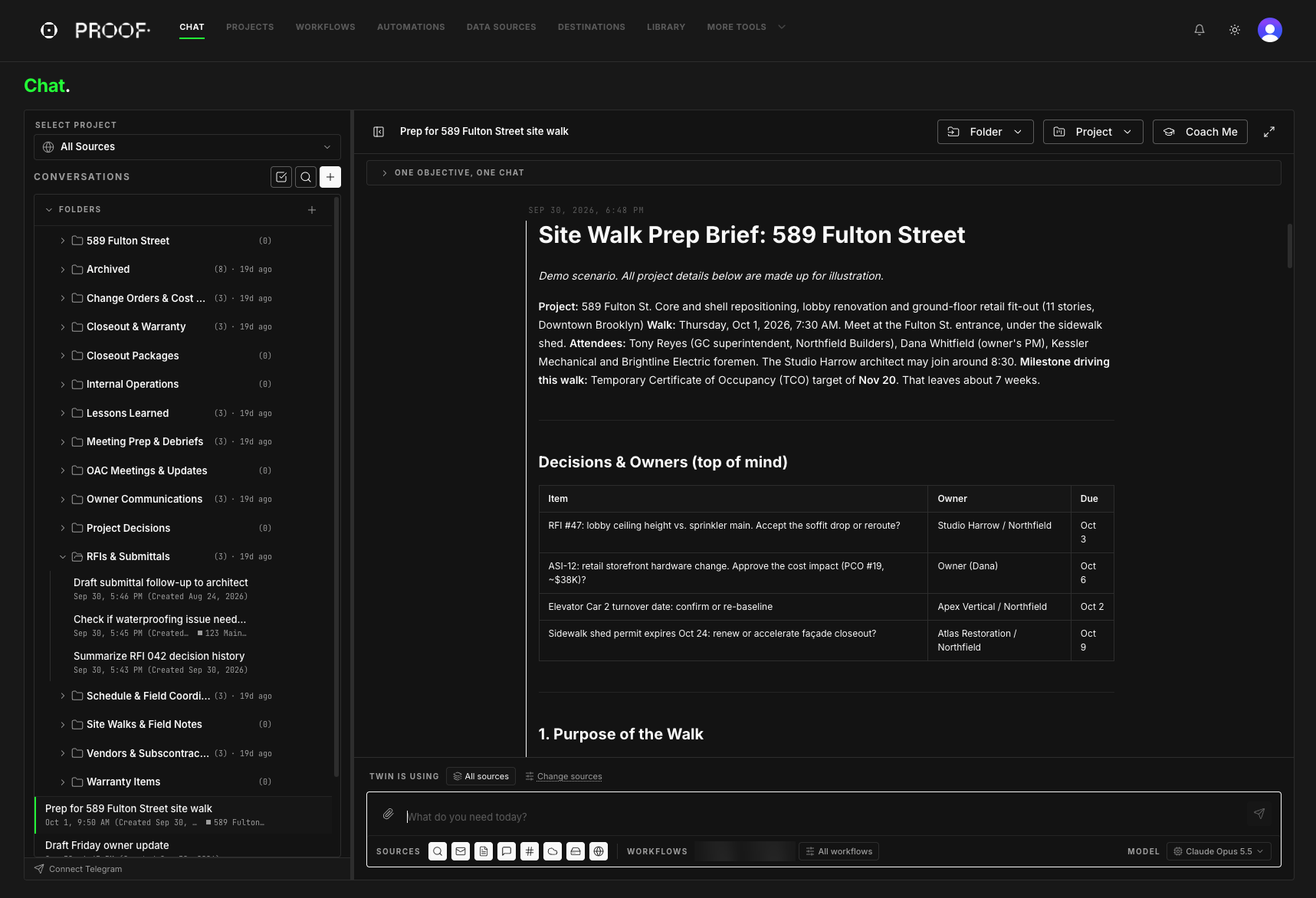
The PROOF chat screen. On the left, conversations are filed in folders such as RFIs and Submittals, Site Walks and Field Notes, and Lessons Learned. On the right, a Twin has prepared a site walk prep brief for 589 Fulton Street, with the project, walk time, attendees, and a table of decisions, owners, and due dates. Below is the message box with sources, workflows, and model choice.
A Twin preparing a site walk brief. Demo scenario; all project details are created for illustration.

What the firm builds

A private knowledge graph for each person. An organizational graph for the firm

Each person has a private Twin. Firm-level knowledge connects under your firm's permissions and governance.

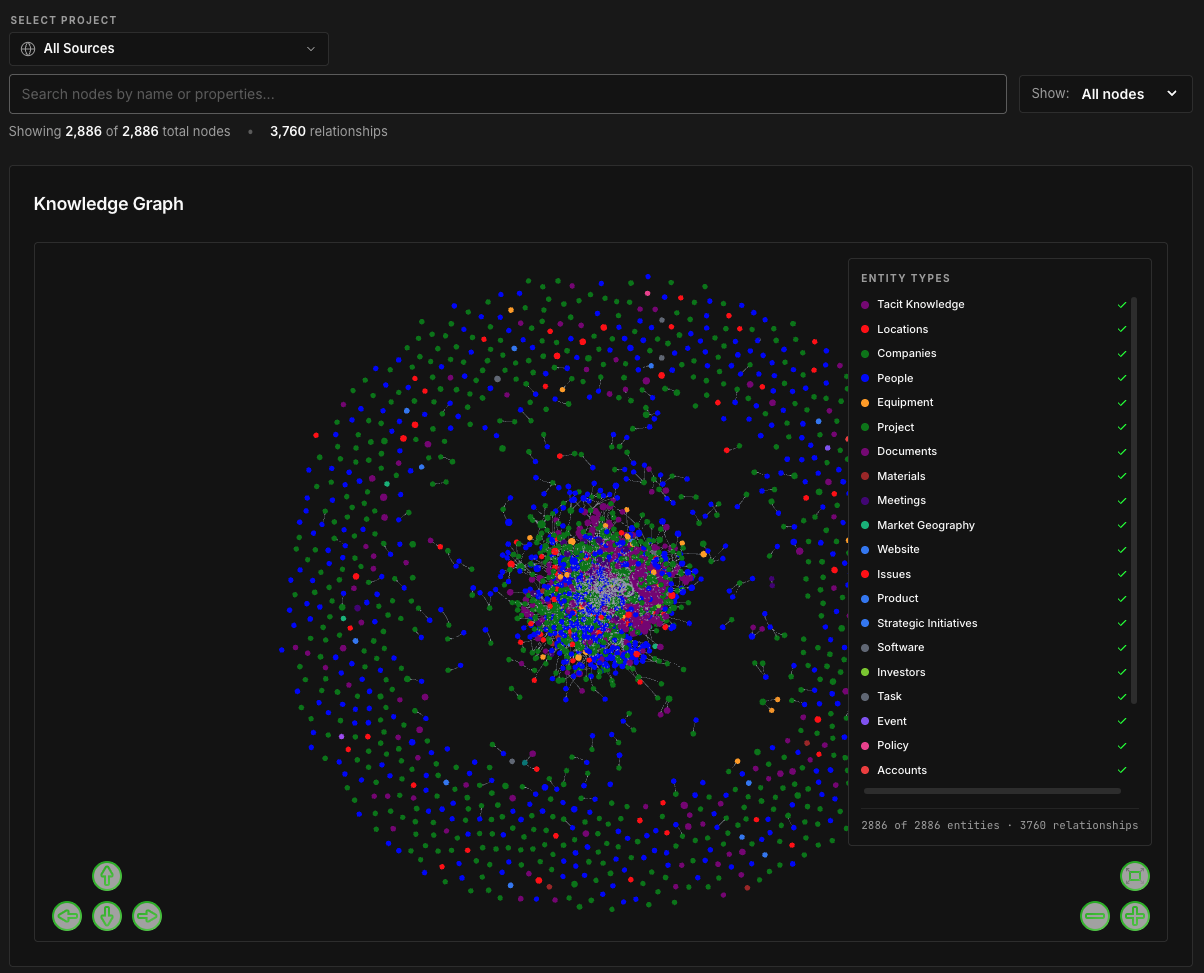
The PROOF Knowledge Graph screen: a search bar and node filter above thousands of connected points in a dense center ring and a wide outer ring, colored by entity type. A legend lists the types, including tacit knowledge, locations, companies, people, equipment, projects, documents, materials, meetings, issues, tasks, events, policies, and accounts.
This visual shows the firm-level Org Graph. Each person also has a private knowledge graph inside their Twin. Today, facts from an individual's email may be shared automatically firm-wide. PROOF plans a human approval step governing what extracted knowledge moves firm-wide.

Each Twin learns the person. The Org Graph preserves what the firm needs. Together, they create a commercial-grade Knowledge System the firm owns and controls.

Included with PROOF

PROOF Call Triage and the PROOF connector

PROOF Call Triage

  • In final testing before client rollout.

Today, PROOF Call Triage captures who called, prepares a short summary, applies an urgency level, and suggests one next step. The call appears as a chat in the person's PROOF.

  1. PROOF captures who called.
  2. It prepares a short summary of the call.
  3. It applies an urgency level:
    • Urgent
    • High
    • Normal
    • Low
  4. It suggests one next step, and the call appears as a chat in the person's PROOF.

Planned: project identification, callback preparation, task and CRM routing, and broader Knowledge System capture.

The PROOF connector

Bring your Knowledge System into the AI app you already use.

  • Your AI app
  • PROOF connector
  • Your firm-owned Knowledge System
  • Live today with Claude, read-only. Search permitted sources, open permitted documents, and ask the PROOF Twin from inside Claude.
  • More AI apps. The connector starts with Claude. Other AI apps can be connected over time.
  • Planned. Two-way "Save this to PROOF," with user confirmation, permission checks, and the applicable approval or capture step.

How adoption grows

Habits first. Then Workflows. Then Automations

The first habit is simple: bring real daily work to your Twin. As that becomes routine, repeated work becomes a reusable Workflow. Where it makes sense, a Workflow can run on a schedule as an Automation. PROOF learns these ways of working from the people who perform them rather than forcing the firm into boxed processes.

  1. Habits.Bring real work to your Twin every day.
  2. Workflows.Reusable ways of working built from what your people repeat.
  3. Automations.Scheduled runs of approved Workflows.

Common first Workflows

  • Call triage and callback follow-up
  • Email triage and reply drafting
  • Contact and opportunity capture
  • Commitment and follow-up tracking

Common next Workflows

  • Meeting preparation and minutes
  • Bid and proposal follow-up
  • RFI and submittal follow-up
  • Change exposure and team handoffs

Daily AI use creates value now. The decisions, corrections, relationships, Workflows, and lessons captured through that work make the firm's Knowledge System more useful over time.

You stay in control

Your Twin prepares. You decide

Each person has a private Twin grounded in their approved work. Your Twin prepares, drafts, organizes, and recommends. You review, decide, and approve. Your firm owns and controls the business knowledge accumulated in its Knowledge System.